> ## Documentation Index
> Fetch the complete documentation index at: https://docs.upstackdata.com/llms.txt
> Use this file to discover all available pages before exploring further.
# How to Update Facebook (Meta) Conversion API Key?
> Rotate or update your Facebook (Meta) Conversion API access token in Upstack Data to keep server-side events flowing into Meta CAPI without breaking pixel health.
## Overview
If you've seen warnings like *"My Conversions API is not getting any events"* or received an email that your *Meta Pixel is unhealthy*, it means your CAPI token needs to be refreshed. This guide walks you through updating your Meta CAPI token in Upstack Data so events flow correctly, attribution stays accurate, and your pixel remains healthy.
* Sign in to Upstack Data at [app.upstackdata.com](https://app.upstackdata.com/pixel/event-destinations) and open **Event Destinations**.
* Click your **Meta destination** to edit it.
* Paste a fresh **CAPI token** (starts with `EAA`) into the **Conversions API token** field.
* Click **Update Configuration** and verify the destination shows **Healthy**.
## Prerequisites
Before you start, you need:
* An active Upstack Data account with a Meta destination already configured
* A new **CAPI token** generated from [Meta Events Manager](https://business.facebook.com/events_manager) — see [How to generate your CAPI token](/guides/facebook-ads/how-to-generate-my-facebook-conversion-api-key)
* The token copied to your clipboard (it is shown only once when generated)
## Configuration steps
Sign in to Upstack Data at [app.upstackdata.com](https://app.upstackdata.com/pixel/event-destinations).
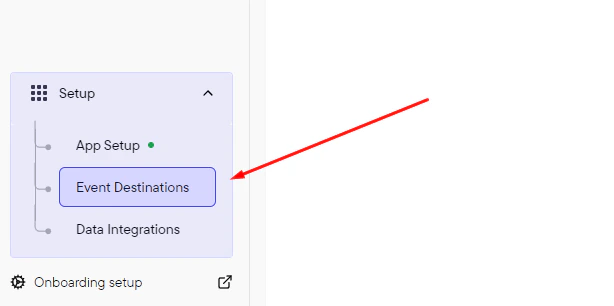
In the Upstack dashboard, navigate to **Event Destinations**.
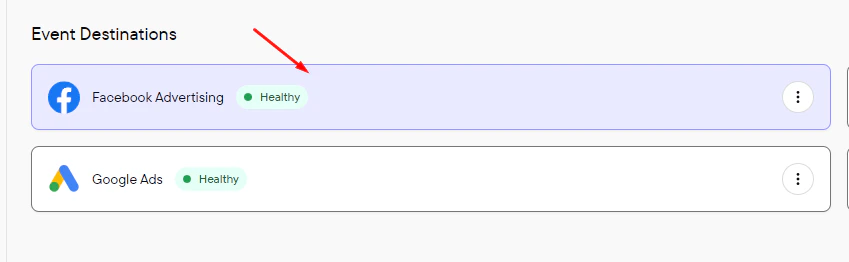
 In the **Event Destinations** list, click your **Meta destination** to edit it.
 Confirm the **Check to enable sending events via Facebook Conversions API** checkbox is selected, then paste your new **CAPI token** into the **Conversions API token** field. Replace the existing value entirely.
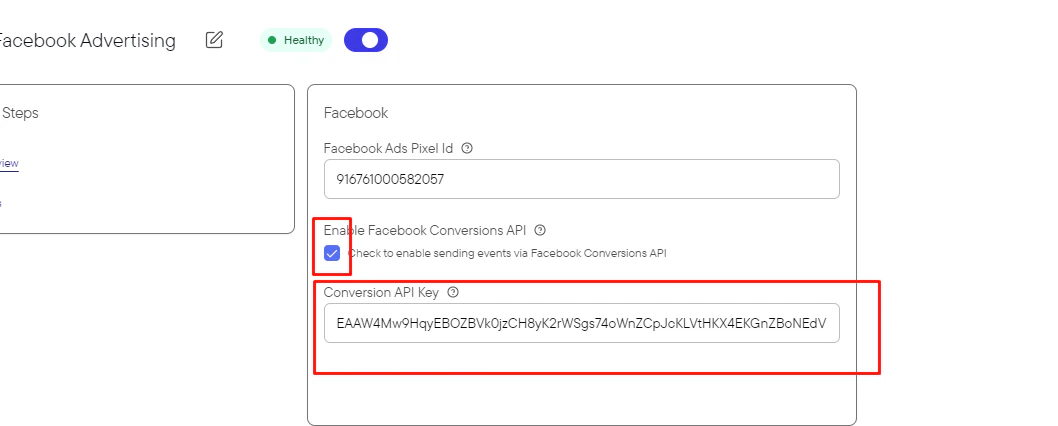 The CAPI token starts with `EAA` and is approximately 190 characters long. Leave the **Pixel ID** unchanged (15–16 digit number, no prefix).
**Need help finding these?**
* [How to generate your CAPI token](/guides/facebook-ads/how-to-generate-my-facebook-conversion-api-key)
* [How to find your Meta Pixel ID](/guides/facebook-ads/how-do-i-find-my-facebook-ads-pixel-dataset-id)
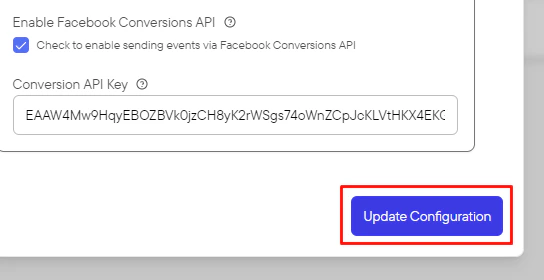
Click **Update Configuration** to save the change.
The CAPI token starts with `EAA` and is approximately 190 characters long. Leave the **Pixel ID** unchanged (15–16 digit number, no prefix).
**Need help finding these?**
* [How to generate your CAPI token](/guides/facebook-ads/how-to-generate-my-facebook-conversion-api-key)
* [How to find your Meta Pixel ID](/guides/facebook-ads/how-do-i-find-my-facebook-ads-pixel-dataset-id)
Click **Update Configuration** to save the change.
 In the Upstack dashboard, the Meta destination card should display **Healthy** with a green status indicator within 5 minutes.
If the status still shows **Unhealthy**:
* Confirm the new CAPI token starts with `EAA` and was pasted in full (no truncation or whitespace).
* Confirm the user who generated the token has admin access to the Meta Business Manager that owns the pixel.
* See [Why is my Meta EMQ panel showing zeros?](/guides/facebook-ads/why-is-my-meta-emq-panel-showing-zeros-0-0-10) for token-permission troubleshooting.
In the Upstack dashboard, the Meta destination card should display **Healthy** with a green status indicator within 5 minutes.
If the status still shows **Unhealthy**:
* Confirm the new CAPI token starts with `EAA` and was pasted in full (no truncation or whitespace).
* Confirm the user who generated the token has admin access to the Meta Business Manager that owns the pixel.
* See [Why is my Meta EMQ panel showing zeros?](/guides/facebook-ads/why-is-my-meta-emq-panel-showing-zeros-0-0-10) for token-permission troubleshooting.