> ## Documentation Index
> Fetch the complete documentation index at: https://docs.upstackdata.com/llms.txt
> Use this file to discover all available pages before exploring further.
# Complete How-To Guide for Onboarding Klaviyo in Upstack Data
> Onboard Klaviyo in Upstack Data — generate the Private API key, configure the destination, and clone abandonment flows to lift triggered abandoned cart, checkout, and browse revenue 40%+.
**New to Upstack?** Follow the [getting started guide](/get-started/install-on-shopify) for a streamlined onboarding walkthrough.
**Quick Summary**
Complete Klaviyo integration requires three essential steps plus a critical follow-up for maximum value from your setup.
* Generate a **Klaviyo Private API key** with Full Access in Klaviyo.
* Connect Klaviyo in the **[Upstack dashboard](https://app.upstackdata.com/pixel/event-destinations)** using the Klaviyo Private API key.
* Contact **[support@upstackdata.com](mailto:support@upstackdata.com)** to activate Upstack abandonment flows.
## Prerequisites
Before you start, you need:
* An active Upstack Data account ([sign up](https://app.upstackdata.com))
* Admin access to a **Klaviyo** account
* The ability to generate a **Klaviyo Private API key** with Full Access ([learn how to generate one](/guides/klaviyo/how-to-generate-klaviyo-api-key-for-upstack-data))
## Part 1: Generate a Klaviyo Private API key
* Sign in to **[Klaviyo](https://www.klaviyo.com/login)**.
* Click your **profile icon** in the bottom-left navigation.
* Go to **Settings → Account → API Keys**.
* Click the **Create Private API Key** button.
* Name the new key **`UpstackData`**.
* Under *Select Access Level*, choose **Full Access Key**.
* Click **Create**.
* Copy and save the Klaviyo Private API key immediately. It starts with `pk_` followed by alphanumeric characters (for example, `pk_aBcDeFgHiJkLmNoPqRsTuVwXyZ012345678`).
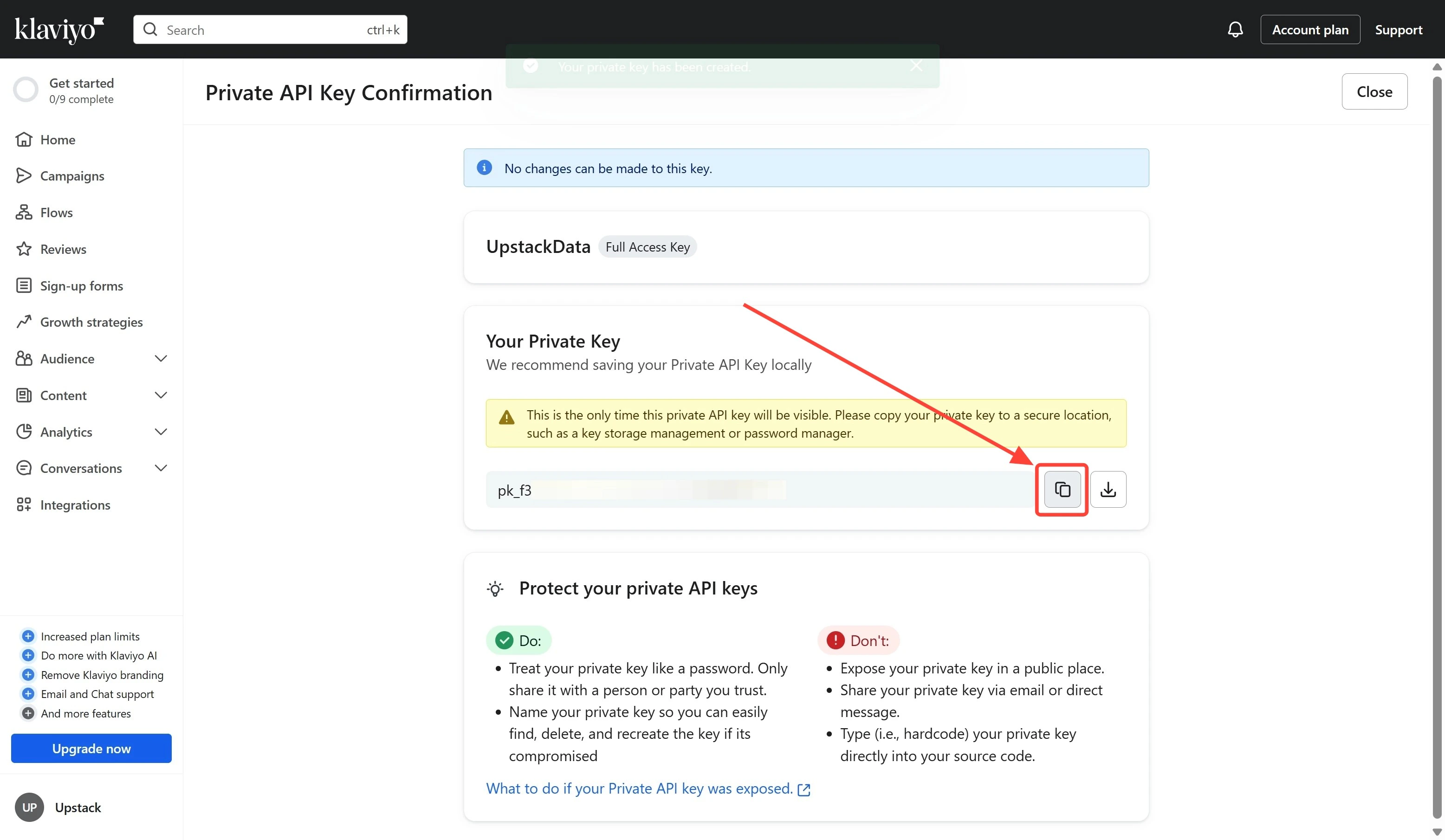 **`Important:`** `This key will only be shown once.`
Need a more detailed walkthrough? See [How to generate a Klaviyo Private API key for Upstack Data](/guides/klaviyo/how-to-generate-klaviyo-api-key-for-upstack-data).
## Part 2: Configure the Klaviyo destination in the Upstack dashboard
* Sign in to **[Upstack Data](https://app.upstackdata.com)**.
* In the Upstack dashboard, navigate to **[Pixel → Event Destinations](https://app.upstackdata.com/pixel/event-destinations)**.
* Click **+ New Destination** in the top-right of the page.
* In the *Select a Destination* popup, choose **Klaviyo** and click **Next**.
* Paste your **Klaviyo Private API key** into the *Private API Key* field.
* Click **Create Configuration**.
**`Important:`** `This key will only be shown once.`
Need a more detailed walkthrough? See [How to generate a Klaviyo Private API key for Upstack Data](/guides/klaviyo/how-to-generate-klaviyo-api-key-for-upstack-data).
## Part 2: Configure the Klaviyo destination in the Upstack dashboard
* Sign in to **[Upstack Data](https://app.upstackdata.com)**.
* In the Upstack dashboard, navigate to **[Pixel → Event Destinations](https://app.upstackdata.com/pixel/event-destinations)**.
* Click **+ New Destination** in the top-right of the page.
* In the *Select a Destination* popup, choose **Klaviyo** and click **Next**.
* Paste your **Klaviyo Private API key** into the *Private API Key* field.
* Click **Create Configuration**.
 **`Success!`** `Klaviyo is now connected to Upstack Data.`
Need a more detailed walkthrough? See [How to configure the Klaviyo destination in Upstack Data](/guides/klaviyo/how-to-configure-klaviyo-destination-in-upstack-data).
## Part 3: Verify the connection
* In the Upstack dashboard, go to **Pixel → Event Destinations**.
* Confirm the **Klaviyo** destination is listed with a **Healthy** status.
* In Klaviyo, go to **Analytics → Metrics** and confirm Upstack-emitted events (for example, **Viewed Product - Upstackified**, **Added to Cart - Upstackified**, **Started Checkout - Upstackified**, **Active on Site - Upstackified**) begin appearing within a few minutes of live traffic.
After completing the Klaviyo setup, contact **[support@upstackdata.com](mailto:support@upstackdata.com)** to request your Upstack abandonment flows be set up. These additive flows improve your abandonment capture by **up to 40% or more**.
**`Success!`** `Klaviyo is now connected to Upstack Data.`
Need a more detailed walkthrough? See [How to configure the Klaviyo destination in Upstack Data](/guides/klaviyo/how-to-configure-klaviyo-destination-in-upstack-data).
## Part 3: Verify the connection
* In the Upstack dashboard, go to **Pixel → Event Destinations**.
* Confirm the **Klaviyo** destination is listed with a **Healthy** status.
* In Klaviyo, go to **Analytics → Metrics** and confirm Upstack-emitted events (for example, **Viewed Product - Upstackified**, **Added to Cart - Upstackified**, **Started Checkout - Upstackified**, **Active on Site - Upstackified**) begin appearing within a few minutes of live traffic.
After completing the Klaviyo setup, contact **[support@upstackdata.com](mailto:support@upstackdata.com)** to request your Upstack abandonment flows be set up. These additive flows improve your abandonment capture by **up to 40% or more**.