

Data direction: This is a source — data flows into Upstack from this platform for analytics, reporting, and enrichment.
This is a source connection — it pulls cost and performance data into Upstack for reporting. To send conversion events to TikTok for ad optimization, see the TikTok Events API destination. Without the source, you’ll see TikTok-attributed conversions in Upstack but no TikTok spend to calculate ROAS against.
Prerequisites
Prerequisites:
- An Upstack Data account (sign up for free)
- Access to your workspace in the Upstack dashboard
- A TikTok For Business login with access to the ad accounts (advertisers) you want to connect
- At least one TikTok ad account with active or historical campaigns
- Popups allowed for app.upstackdata.com (the TikTok sign-in opens in a popup)
Setup
1
Open Data Sources
Sign in to your Upstack Data account and open System → Data Sources.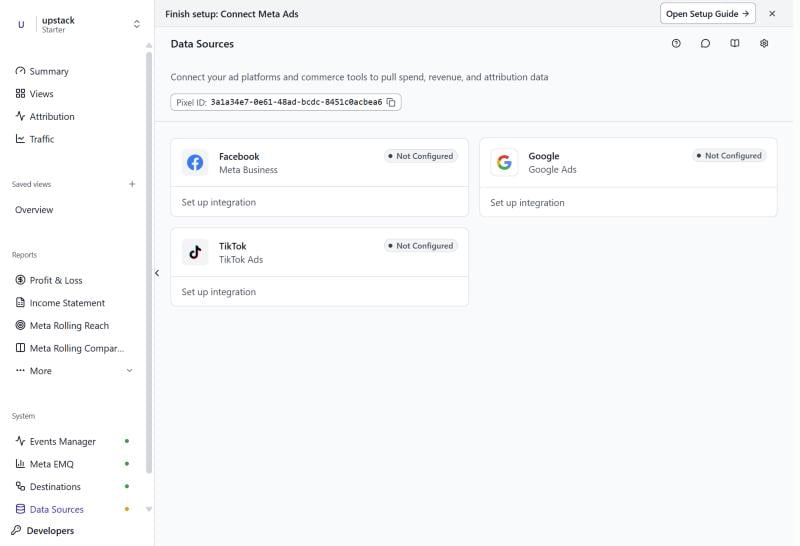
2
Open the TikTok settings
Click the TikTok card. The TikTok Integration Settings dialog opens with the connection status.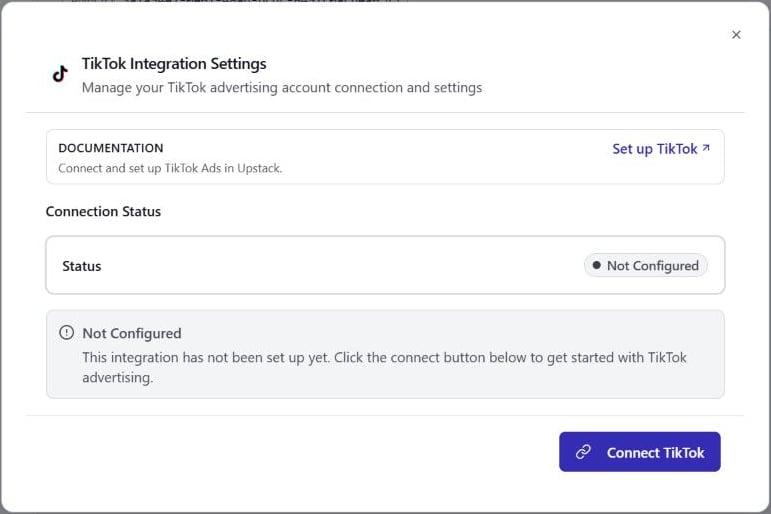
3
Connect TikTok
Click Connect TikTok. In the popup, sign in to TikTok For Business and authorize Upstack to access your advertiser accounts. The popup closes when you’re done.The card status changes to Pending until you finish the next step.
4
Select ad accounts
Back in the dialog, the Ad Accounts section lists the TikTok ad accounts you authorized, with each account’s name and ID. Select one or more accounts to sync. If an account is missing, click Refresh.
5
Save
Click Save & Complete Setup. The dialog closes and the TikTok card shows Connected.The initial import covers up to 36 months of history. After that, Upstack checks for updated metrics every 15 minutes, re-pulling the most recent 2 days so late-arriving spend is captured.
If you close the dialog before saving, Upstack asks you to confirm. Choosing Close & Finish Later leaves the card in Pending, and nothing syncs until you select an ad account and save.
Change, reconnect, or disconnect
Click the TikTok card on System → Data Sources to manage the connection:- Add or remove ad accounts: click Edit, change the selection, and click Save Changes.
- Reconnect: if the card shows Error or Disconnected, click Reconnect and sign in again.
- Disconnect: click Disconnect to stop syncing TikTok spend.
What Data Flows In
Upstack imports performance data at the advertiser, campaign, ad group, and ad level, by day and by hour:
Upstack also imports the campaign structure (campaigns, ad groups, and ads), including names, objective, status, bid type, budget, optimization goal, and billing event.
Spend is stored in the ad account’s currency and each day follows the ad account’s time zone. Reports convert spend to your reporting currency using daily exchange rates.
Click ID Tracking
When visitors arrive at your store from a TikTok ad, thettclid (TikTok Click ID) parameter is captured by the Upstack Pixel and stored in the visitor’s session. This ttclid links the ad click to subsequent conversion events for deterministic click-to-conversion attribution.
You’ll Know It’s Working When…
- The TikTok card on System → Data Sources shows Connected
- TikTok spend appears in the Attribution dashboard once the initial import completes
- ROAS populates for campaigns that have both spend data and attributed conversions
Troubleshooting
No data appearing after connecting
No data appearing after connecting
Check that the TikTok card shows Connected, not Pending. A Pending card means no ad account was saved: click the card, select your accounts, and click Save & Complete Setup.If the card shows Connected and no data appears after a few hours:
- Verify the selected ad accounts had spend in the last 36 months (the import window)
- Confirm you selected the right account (check the ID matches the Advertiser ID in TikTok Ads Manager)
- Contact support with your Pixel ID
An ad account is missing from the list
An ad account is missing from the list
The list shows the ad accounts you authorized in the TikTok popup. Click Refresh to reload it. If the account is still missing, click Reconnect and make sure you authorize that ad account when TikTok asks which advertisers Upstack can access.
Spend numbers don't match TikTok Ads Manager
Spend numbers don't match TikTok Ads Manager
Small discrepancies are normal while the most recent days are still being re-pulled.Common causes of larger discrepancies:
- Time zone — each day follows the ad account’s time zone. If your Upstack reporting timezone differs, compare the same date range in both time zones.
- Currency — if your TikTok ad account bills in a different currency than your reporting currency, Upstack converts with daily exchange rates, which can cause small differences.
- Ad accounts — make sure every ad account that spends for your store is selected.
Card shows Error
Card shows Error
The saved TikTok authorization no longer works, usually because access was revoked in TikTok For Business. Syncing stops until you reconnect.
- Click the TikTok card on System → Data Sources
- Click Reconnect and authorize Upstack again
- Check that your ad accounts are still selected
Still stuck? Contact support@upstackdata.com with your Pixel ID and a description of the issue. We typically respond within a few hours.
Related
TikTok Events API Destination
Send conversion events to TikTok — the outbound counterpart to this inbound source.
TikTok onboarding guide
Step-by-step walkthrough for setting up TikTok end-to-end in Upstack.
Connect Facebook Ads
Import Facebook Ads spend data for a complete view of paid social performance.
Attribution and Reporting
How Upstack blends ad spend data with conversion events to calculate ROAS and CPA.