

If you’re on Stripe billing (most accounts)
1
Open your billing settings
Log in to your Upstack Data account, then go to Settings → Billing.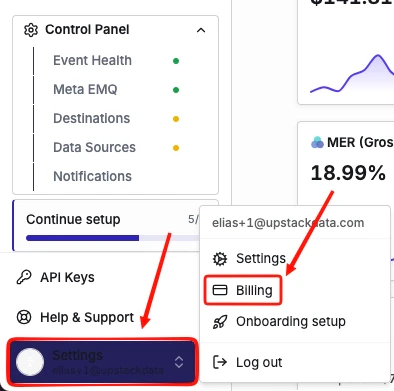
2
Open the Billing History tab
Click the Billing History tab to see all of your previous invoices.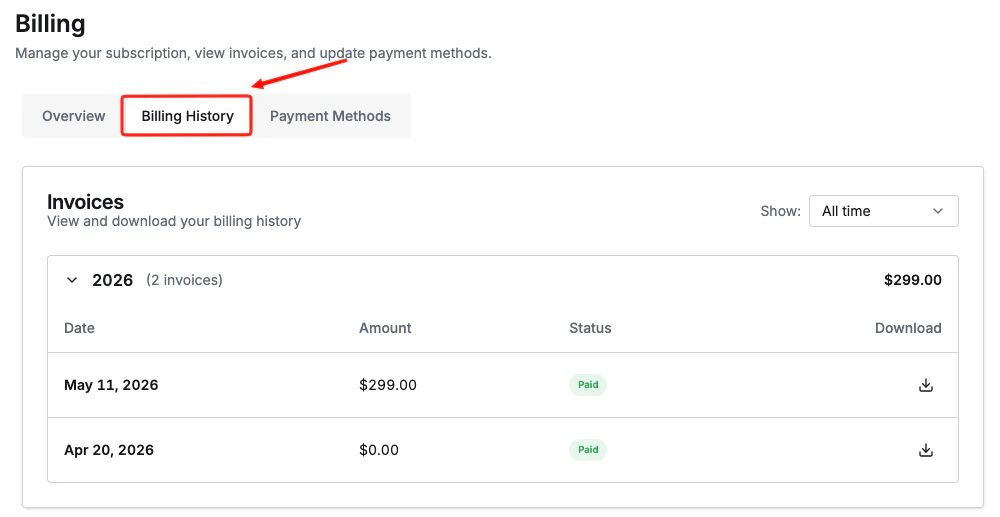
3
View or download an invoice
Click any invoice to view its details or download it as a PDF.
If you’re on Shopify billing
Shopify handles invoicing for apps billed through the Shopify App Store. To view your charges:- Log in to your Shopify admin.
- Go to Settings → Billing.
- Select a billing cycle to see itemized app charges, including Upstack Data.
Not sure which billing type you’re on?Refer to How do I identify my billing method? to find out which billing method you’re on.