

Short answer: this is normal and you can disregard it.No action is needed. Your events are already being sent through the Conversions API by Upstack Data. Do not click “Review solution” and do not set up Meta’s Conversions API Gateway — doing so will cause duplicate events.
What You’re Seeing
In Meta Events Manager, under “Top errors affecting your performance” (or the Diagnostics tab), you see a warning that looks like this: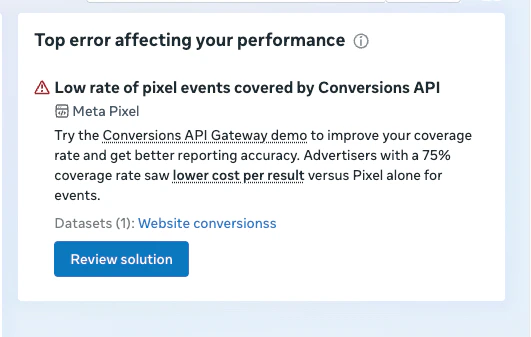
Low rate of pixel events covered by Conversions APITry the Conversions API Gateway demo to improve your coverage rate and get better reporting accuracy. Advertisers with a 75 percent coverage rate saw lower cost per result versus Pixel alone for events.
Why You Don’t Need to Do Anything
This is one of Meta’s standard recommendations, shown across many ad accounts, and for Upstack Data customers it’s a false positive. Here’s why you can safely ignore it:-
Upstack is already sending your events through the Conversions API. Every event we track is sent twice — once from the browser pixel and once server-side through CAPI — with a shared
event_idso Meta deduplicates them into a single event. - The “Review solution” flow is designed for advertisers who don’t have CAPI set up. That is not you. Meta shows the same prompt to every account that dips below their target coverage rate, regardless of whether a CAPI integration is already running.
- Your reporting, attribution, and optimization are unaffected. The warning does not impact how Meta counts your conversions or optimizes your ad delivery.
What You Should NOT Do
- Do not click “Review solution” or start Meta’s Conversions API Gateway demo
- Do not install Meta’s Conversions API Gateway (the Cloudflare-hosted CAPI forwarder)
- Do not enable CAPI through the Shopify Facebook & Instagram sales channel
- Do not install any third-party CAPI app (for example, other tracking tools that also offer server-side Meta events)
Why Meta Shows This Warning Anyway
Meta’s “coverage rate” compares two event streams on the same pixel: browser events (fired by the Meta Pixel JavaScript) and server events (sent via the Conversions API). When the ratio of matched browser-to-server events drops below roughly 75 percent on a rolling window, Meta surfaces this warning. A few reasons you can see this warning even though Upstack is working correctly:- Measurement noise. Meta’s coverage math is not always perfect, especially on low-volume days or when events arrive out of order. Short dips below the threshold are common and self-correct over time.
- Rolling window lag. The metric is calculated over a trailing 7-day window, so recent fixes (new token, new setup) take a few days to show up in the score.
- Browser events from non-Upstack sources. If another tool on your site is firing browser pixel events that Upstack doesn’t see — for example, a raw pixel in your Shopify theme, a GTM tag, or a landing page builder — those events have no matching server-side pair, which lowers coverage. See “When to contact us” below.
When to Contact Us
You only need to reach out if you see one of the following, which would suggest a real issue rather than normal measurement drift:- Your Meta destination inside Upstack Data is flagged as “needs attention” or shows as unhealthy
- Your Event Match Quality (EMQ) scores drop sharply in the Upstack dashboard
- Your reported Meta conversions are meaningfully different from your actual orders in Shopify or WooCommerce
- You suspect another pixel is firing alongside Upstack and want help identifying it
Related Articles
- Why is my Meta EMQ Panel Showing Zeros (0.0/10)?
- How to Configure Facebook (Meta) Ads Pixel Destination in Upstack Data
- How to Generate my Facebook Conversion API Key
- How to Update Facebook (Meta) Conversion API Key
Still have questions?If you’re unsure whether the warning in your account is normal or something to worry about, message our support team with your Pixel ID and store URL. We’ll check your CAPI event stream and confirm everything is healthy.